Self-hosted CRM
A CRM that runs on your server, not someone else’s.
Outbound OS is an open-source CRM and outreach platform you run with Docker Compose. Leads, conversations and channel credentials live in your own database, on a machine you control, with no per-seat software bill.
Install
Start with Docker. Connect from the dashboard.
The first boot creates the database, generates the secret keys and makes your admin account. Then the setup wizard asks for your business details and first channel.
$ git clone https://github.com/thatsarpit/outbound-os.git
$ cd outbound-os
$ cp .env.example .env
$ docker compose up -d
Open http://localhost:3001 and sign in with the ADMIN_EMAIL you set in .env. If you left ADMIN_PASSWORD empty, a generated one is printed once in the logs.
What runs where
Small enough to understand, complete enough to run a team.
One app container
A Node.js API that serves the dashboard, receives webhooks and runs the schedulers for first contact, follow-ups and campaigns.
One data volume
The SQLite database and the instance’s generated keys, in a named Docker volume that survives rebuilds.
An optional MCP container
For AI agents such as Claude. Off unless you start it with the mcp profile.
No telemetry
The only outside calls are the ones you configure: Meta, your mailboxes and the integrations you switch on. Error reporting exists only if you add your own Sentry key.
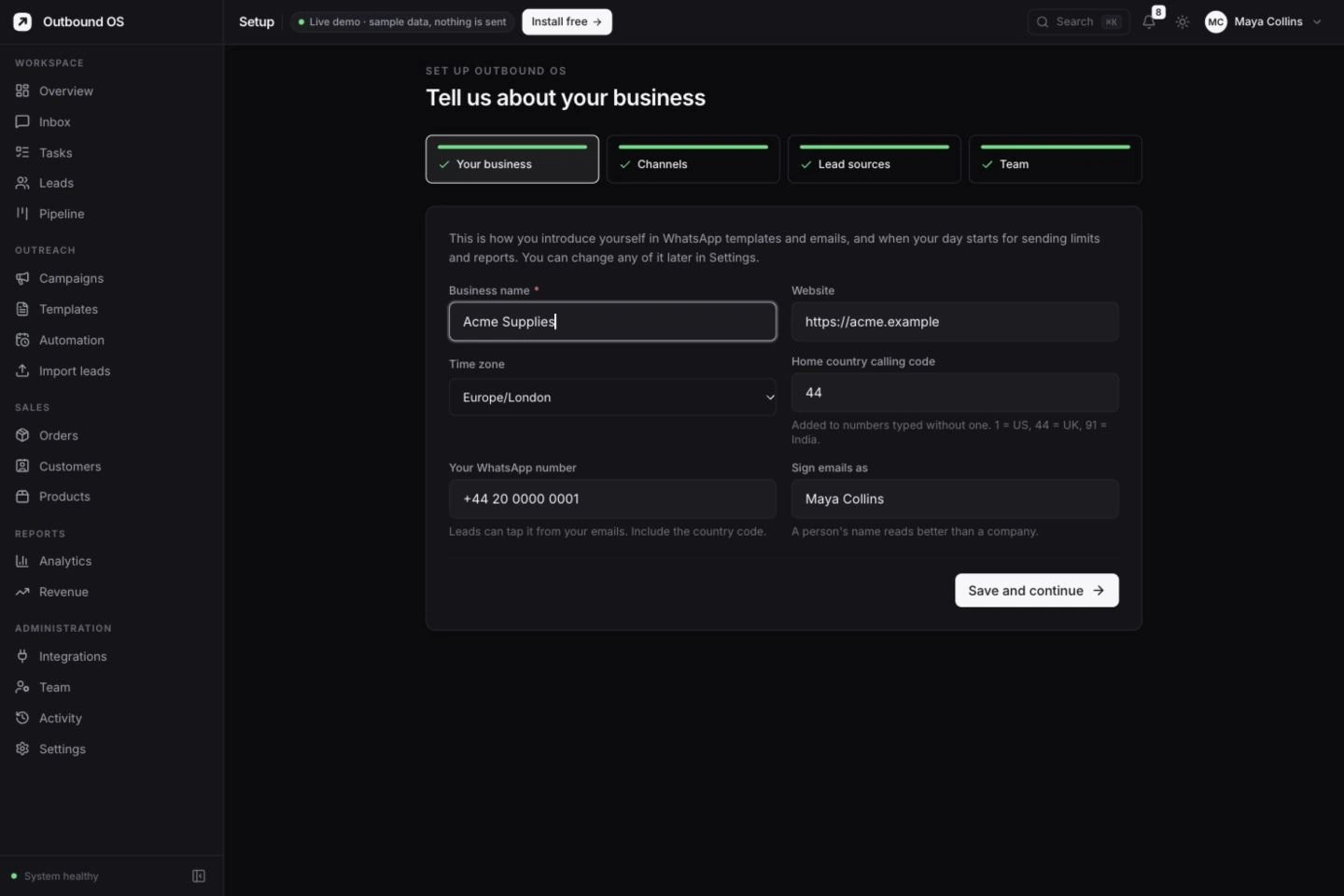
First sign-in
A setup wizard instead of a config file.
Only an admin email is needed to boot. Business name, time zone, currency, default country code, channels and lead sources are all set from the dashboard, and nothing sends until you connect it.
Trade-offs
Self-hosted or hosted: an honest comparison.
| Self-hosted Outbound OS | A typical hosted CRM | |
|---|---|---|
| Where the data lives | Your server, your database file | The vendor’s infrastructure |
| Pricing | Free software; you pay for the server | Usually per seat or per contact, per month |
| Changing the product | Edit the code, or add a webhook source in settings | Limited to what the vendor exposes |
| Updates and uptime | Your job: two commands to update | The vendor’s job |
| Support | GitHub issues and Discussions, or managed hosting | Vendor support, by plan |
Want the ownership without running the server? Managed hosting sets up and runs an instance for you.
Backups
Back up the database and the instance secrets together — saved credentials cannot be decrypted without the secrets file. The included script checks the database’s integrity and keeps the seven most recent database snapshots. Include uploaded media in your recovery plan too.
docker compose exec app bash scripts/backup.sh
docker compose cp app:/app/data/backups ./backups
docker compose cp app:/app/data/instance-secrets.json ./backups/
Updates
Make a complete backup and review release notes before pulling the chosen image. Migrations run on start; the backup gives you a recovery path if an upgrade needs to be reversed.
git pull
docker compose pull && docker compose up -d
Read the backup, upgrade and recovery guide before updating a live workspace.
FAQ
Self-hosting questions
What is a self-hosted CRM?
A CRM you run on infrastructure you control. You manage the database, backups, server access and availability. Connected channels such as Meta and your email provider still have their own requirements, terms and usage charges.
What are the server requirements?
Docker and Docker Compose. Start around 2 GB of memory for a small deployment and monitor memory, media storage and backup space as usage grows. Provider webhooks, including WhatsApp replies, need a public HTTPS address.
Which database does it use?
SQLite, stored in a Docker volume, with no separate database server. The included backup script uses SQLite’s online backup API and checks the result. Keep the instance secrets and uploaded media with your recovery copies.
How do I update it?
Create a complete backup first, review the release notes and follow the upgrade guide. Pull the chosen release and restart with Docker Compose. Database migrations run when the app starts.
Can I run it without Docker?
Yes. It is a Node.js 24 application with a React dashboard; the README covers running the API and dashboard directly for development.
Is self-hosting secure?
It can be more private than a hosted CRM, but the responsibility is yours. Outbound OS encrypts stored channel credentials, generates its own signing keys, and has roles for admins, managers, agents and viewers. You keep the server patched, put it behind HTTPS and protect the backups.
Keep reading
Ready to make it your own?
One Docker command starts the app, creates the database and your first admin. The setup wizard does the rest.
git clone https://github.com/thatsarpit/outbound-os.gitcd outbound-oscp .env.example .envdocker compose up -dOpen http://localhost:3001 and sign in